Scripting Logic Node for Gira X1/L1 and Homeserver
With the SCRIPTING Logic Node you can combine calculations, text processing and custom logic into a single powerful block, replacing multiple formula, formatter and parser modules at once.
Build compact logic flows, reduce wiring complexity and create advanced automations with just a few lines of code. From smart data handling to dynamic text generation and complex conditions: everything runs inside one fast, flexible node.
One block. Endless possibilities.
Download
Latest version of Scripting X1 Logic Node (v.0.2.000000) (Supports JS/Lua/Python)
Latest version of Scripting L1 Logic Node (v.0.2.000000) (Supports JS/Lua)
Latest version of Scripting Homeserver Baustein (v1.1) (Supports JS)
Use below scripting editor and cut/paste the one-liner in the logic node.
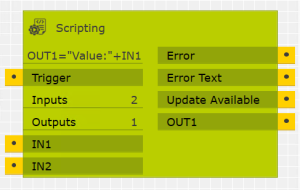
Logic Node for Gira X1/L1
(also available for Homeserver, see below)
Other X1/L1 Nodes you might like
Miele Duco CounterPlus
Click the line below to copy it into the Scripting Logic Node:
How it works
The X1/L1 Logic node works slightly different than the Homeserver Building Block.
X1/L1
Sending any value to the Trigger port (bool/number/text, even false or zero) will execute the script.
Just select the number of Input and Output ports you wish to use. All port accept any value (text/boolean/numbers).
The Logic Node will check for any updates during project check and report the update in the GPA. It will also check for updates about weekly once deployed on the X1/L1.
When enabling debug, debug text will go to the “Error Text” output, including the script execution time.
Homeserver
There are 10 number inputs: IN1-IN10 and 10 text inputs: IN11-IN20.
Outputs are: OUT1-OUT10 (numbers) and OUT11-OUT20 (text).
The Building Block can be triggered by sending any number or boolean to the Trigger input (also zero or false).
It will do an update check when deployed on the homeserver (about weekly).
When enabling debug, it will print debug text to the Homeserver console (when you connect it to a VGA monitor).
Both the X1/L1 and the Homeserver follow the these rules:
- If Input or Output ports are not set we assume they are 0 (zero) or “0”. So if IN2 is not set, the following script will give 0.
- We also assume 0 (zero) or ”0″ for output ports when they are not set, so the follwing script will also be 0 when OUT2 has no value yet.
- All ports are always set when the block is triggered. If you want Send-By-Change (SBC), use a SBC block at the output.
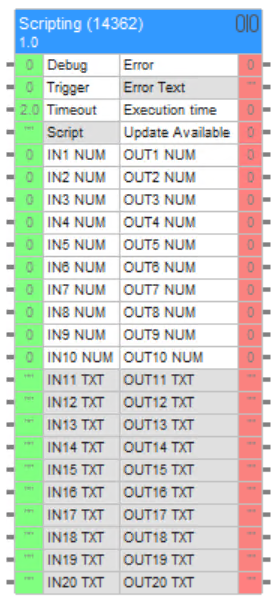
Building Block for Gira Homeserver
Javascript Examples (X1 / L1 / Homeserver)
Numbers
Strings (text)
Logic
JSON (extract data easily!)
 Sample JSON:
{
  "device": {
    "name": "LivingRoomController",
    "status": "online",
    "metrics": {
      "temperature": 21.6,
      "humidity": 48,
      "power": 312.4
    },
    "modes": [
      { "id": 1, "name": "Auto", "active": true },
      { "id": 2, "name": "Eco", "active": false },
      { "id": 3, "name": "Boost", "active": false }
    ]
  }
}
LUA Scripting (X1 / L1 / Homeserver)
General examples
Do clamping (minimum value of 0 and maximum value of 100)
Remember the lowest (OUT2) and Highest (OUT3) values in memory and also have the average of those two (OUT1)
Python 2.7 + packages Examples (X1 only!)
Using external Libraries (pymodbus, paho (mqtt) and requests with json)
Get two values from Modbus Holding Registers, do some calculations on it and write them to OUT1 and OUT2:
Sending a message to a MQTT server with authentication:
Requests and JSON with Python:
AI
Examples of asking ChatGPT, CoPilot or DeepSeek for a script:
"Can you generate JavaScript code for the Gira X1 Scripting Logic Module (see examples at https://www.roelbroersma.nl/scripting)?
I have 2 inputs and 1 output.
-
IN1 = weather information as text
-
IN2 = expected afternoon temperature (number)
Requirements:
-
Output format:
Temp: XX°C - DESCRIPTION -
DESCRIPTION must be truncated to 20 characters and end with
..if longer -
Use only plain JavaScript compatible with Jint
-
Assign the result to OUT1″
Release notes (X1 Logic Node)
v0.2.000000 (19-mar-2026)
- Separated module for X1 and L1.
- Both modules now support LUA Scripting!
- X1 Module supports Python 2.7 with all basic libraries and paho/mqtt, requests, urllib2, urllib3, pymodbus, schedule, jinja2, flask, websocket, yaml, bacpipes (BacNet!) and much more.
- Completely re-engineerd system for including packages.
- Completely re-engineered separated worker process for Lua and Python scripting.
- Timeout can be 0 (zero), for endless processes like receiving mqtt or a webserver!
- Number of Inputs and Outputs can be 0 – 50 (instead of 1-50), so you can start a webserver or script without any input or output.
- Triggering the Clear function will release the Worker process (handy when using timeout=0)
- Implemented STATE memory (memory within the same block, so you can do: STATE.x = STATE.x+1; OUT1=STATE.x; to create a counter every time you trigger.
- Implemented SHAREDSTATE memory (memory between multiple blocks!), so you can do: SHAREDSTATE.x = 5 in one block and use OUT1=SHAREDSTATE.x in another block.
v0.1.000025 (23-feb-2026)
- Feature: Set script timeout and see Execution time. Test it with a script like: for (i=1;i>0;i++)
v0.1.000024 (02-feb-2026)
- Fix: Update Notification in GPA (didn't work!).
- Fix: You couldn't Trigger the block when not all inputs are set, fixed by pre-filling with 0 (zero).
- Fix: A lot of small fixes ans possible NullPointerExceptions.
- Feature: Implemented great Debug logging (enable Debug to see what's happening).
- Feature: Debugging shows script execution time. (a hard limit is set at 200ms).
v0.1.000018 (01-feb-2026)
- Initial version
- Tested on Gira GPA v6.0. X1: v3.0.52 and L1: v2.5.149, but may work on lower versions.
Release notes (L1 Logic Node)
v0.2.000000 (19-mar-2026)
- Separated module for X1 and L1.
- Both modules now support LUA Scripting! L1 module will not support Python because of too less memory/space.
- Completely re-engineerd system for including packages.
- Completely re-engineered separated worker process for Lua scripting.
- Timeout can be 0 (zero), for endless processes, however, be carefull with this (your L1 might hang and need to restart)
- Number of Inputs and Outputs can be 0 – 50 (instead of 1-50), so you can start a script without any input or output.
- Triggering the Clear function will release the Worker process (handy when using timeout=0)
- Implemented STATE memory (memory within the same block, so you can do: STATE.x = STATE.x+1; OUT1=STATE.x; to create a counter every time you trigger.
- Implemented SHAREDSTATE memory (memory between multiple blocks!), so you can do: SHAREDSTATE.x = 5 in one block and use OUT1=SHAREDSTATE.x in another block.
Release notes (Homeserver Building Block)
v1.1 (20-feb-2026)
- Small timing/caching fix with uuid
v1.0 (17-feb-2026)
- Tested with Experte 4.13 (but should work on older versions >4.5. Experte 4.5 and older might not work)